Auth And Security
BrickflowUI now treats authentication, authorization, and browser-facing security as first-class framework concerns rather than ad hoc example code.
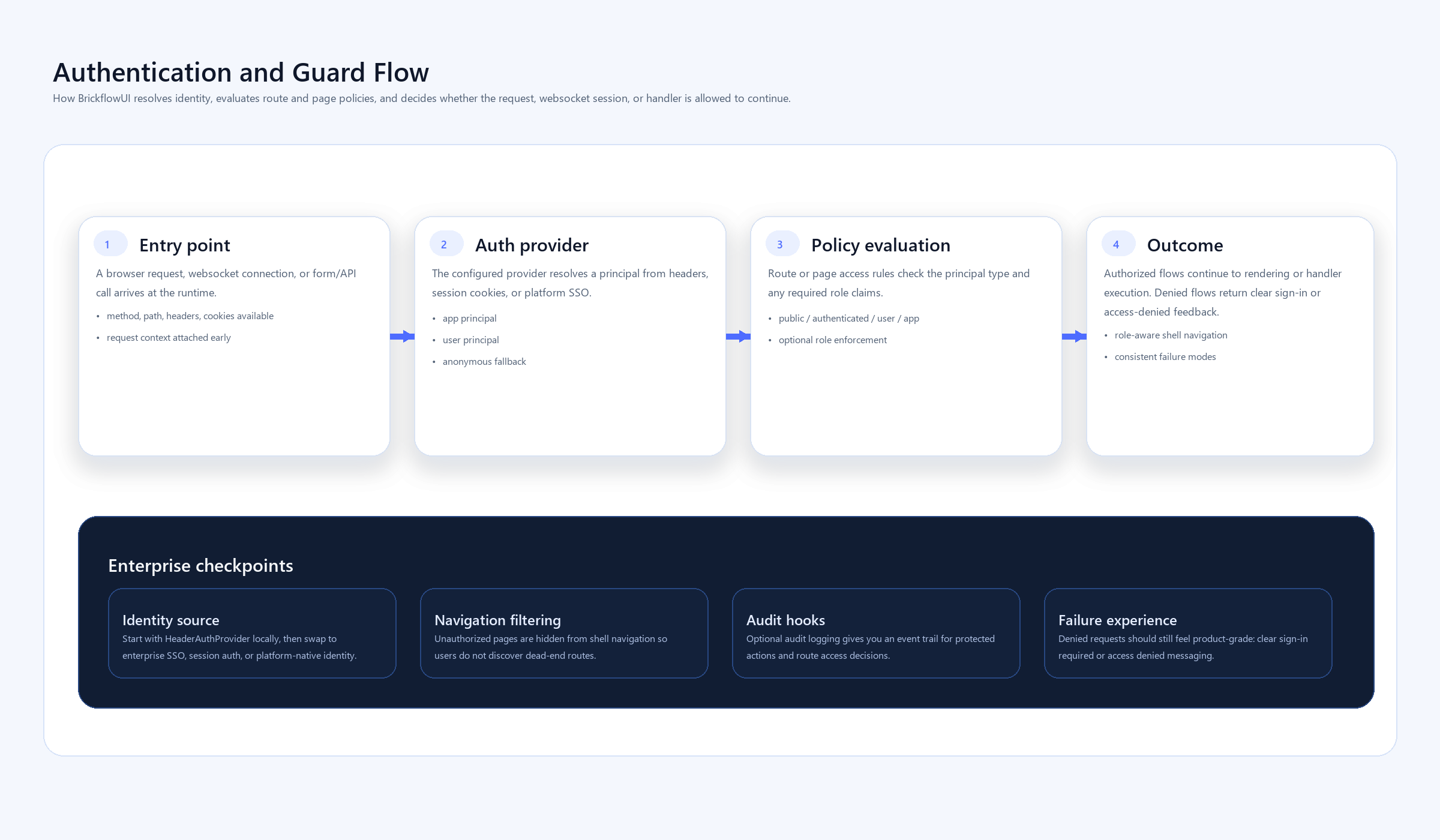
Core Model
The framework separates three concerns:
AuthProvider: resolves identity from HTTP requests and WebSocket sessions.- Access levels:
public,authenticated,user, orapp. - Role checks: explicit role lists on pages and routes.
This keeps the browser as a renderer while the server remains authoritative for identity and access decisions.
Supported Patterns
Use auth_mode="app" when the portal should always run as the application identity.
Use auth_mode="user" when pages or routes depend on signed-in user identity.
Use auth_mode="hybrid" when the app should fall back to an application identity but still honor user identity when it is present.
Route And Page Guards
import brickflowui as db
from brickflowui.auth import HeaderAuthProvider

app = db.App(
    auth_mode="user",
    auth_provider=HeaderAuthProvider(),
)

@app.page("/ops", title="Operations", access="user", roles=["ops"])
def operations():
    return db.Text("Ops-only view")

@app.route("/api/audit", methods=["POST"], access="user", roles=["ops"])
async def write_audit():
    return {"status": "ok"}
Browser Safety Defaults
The server applies:
- CSP headers
X-Content-Type-Options: nosniffX-Frame-Options: SAMEORIGIN- WebSocket origin checks
- optional trusted-host middleware
- browser-oriented CSRF checks for unsafe HTTP methods
CSRF Protection
When csrf_protection=True on App, BrickflowUI issues a CSRF cookie for browser sessions and expects the matching X-Brickflow-Csrf header on unsafe HTTP form/API requests.
This is wired automatically for db.Form(...).
Machine-to-machine clients are not forced into a browser-style CSRF flow unless they present browser-like session context.
Role-Aware Navigation
Multi-page shells now filter navigation items using the current principal. A user only sees pages they are allowed to enter.
This avoids the awkward enterprise experience where a user sees links they cannot actually access.
Audit Logging
Set audit_events=True on App when you want the runtime to log event execution metadata such as session id, principal, page path, and event id.
This is useful for regulated internal tools and debugging sensitive workflows.
Embed Safety
Use allowed_embed_origins=[...] on App when you need to strictly control which remote iframe sources can appear in the portal.
app = db.App(
    allowed_embed_origins=[
        "https://app.datadoghq.com",
        "https://lookerstudio.google.com",
    ]
)
Recommended Enterprise Path
For a serious internal deployment:
- choose
auth_mode="user"orauth_mode="hybrid" - implement an
AuthProviderthat maps your platform identity toPrincipal - protect routes and pages with access levels and roles
- keep
csrf_protection=True - enable
audit_events=Truefor sensitive workflows - allowlist external embeds explicitly when used