Architecture
This page explains BrickflowUI end to end: what runs in Python, what runs in the browser, how state moves, how events are serialized, and what must ship for Databricks Apps to work reliably.
Pair this page with:
System shape
BrickflowUI is a Python runtime plus a packaged frontend bundle.
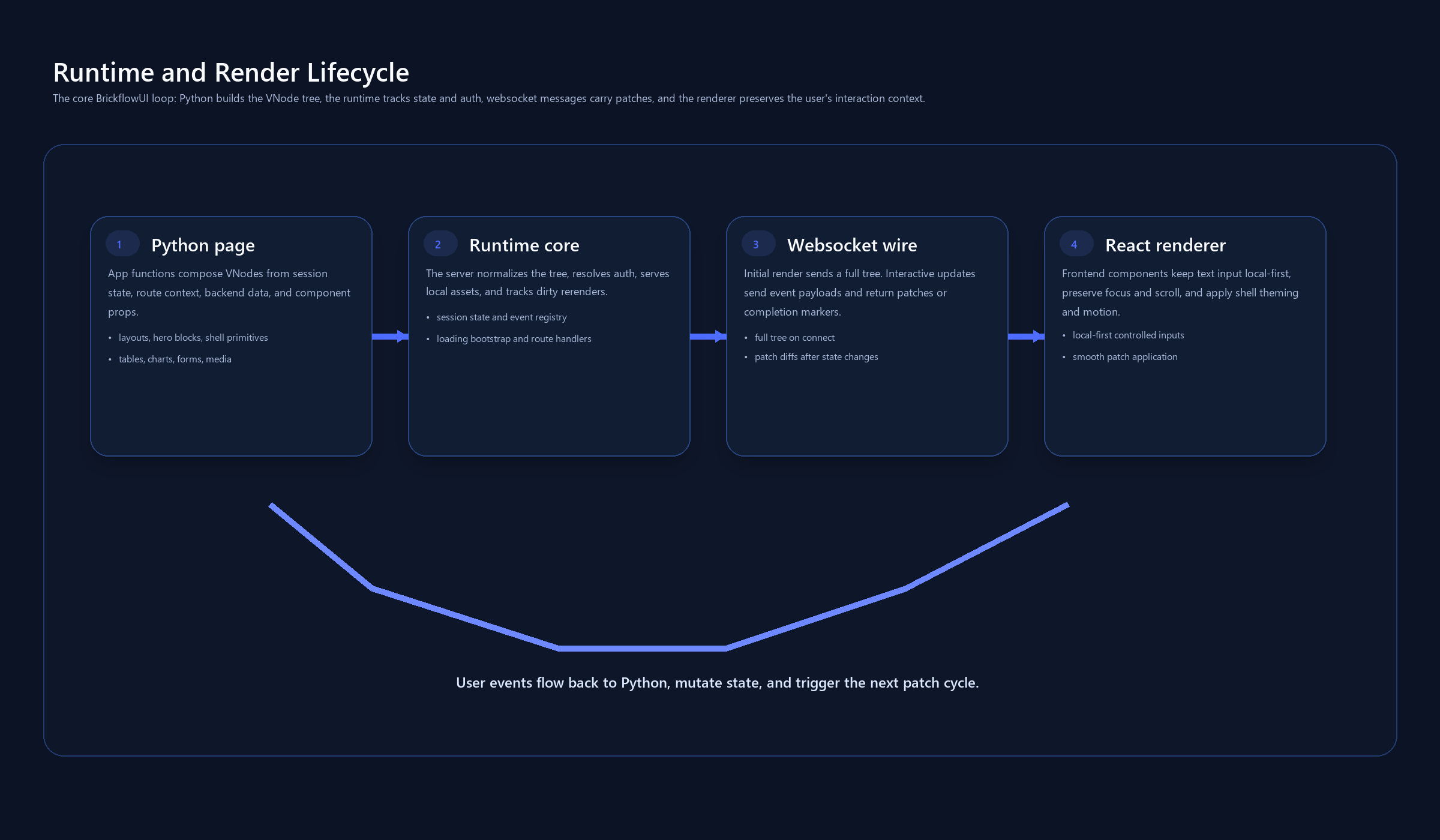
Runtime layers
1. App authoring layer
You write pure Python:
App@app.page(...)@app.route(...)use_state,use_effect,use_memo- component functions from
brickflowui.components
The authoring model feels similar to a React component tree, but the tree is created in Python.
2. Virtual UI layer
Every component returns a VNode.
A VNode contains:
typepropschildren- event handlers that are registered server-side and exposed as event ids to the browser
This keeps the wire protocol small and framework-specific.
3. Server runtime
brickflowui.server creates the ASGI app.
The runtime is responsible for:
- serving the frontend shell from
brickflowui/frontend/dist/index.html - serving static assets from
brickflowui/frontend/dist/assets/ - opening the
/eventsWebSocket - rendering a full tree on first connect
- diffing old and new trees on updates
- applying auth checks for pages and routes
- adding security headers
4. Frontend runtime
The browser receives:
- a full tree on first render
- incremental patches after state changes
The React renderer maps each serialized node type to a real UI primitive:
- layout
- inputs
- tables
- charts
- overlays
- pipeline graph
- chatbot controls
Render lifecycle
First render
- Browser loads the HTML shell.
- Frontend connects to
/events. - Server creates a session-specific
RenderContext. - The current page function runs.
- The resulting VNode tree is serialized and sent to the browser.
Interactive update
- User clicks, types, toggles, or submits.
- Frontend sends an event id plus payload to the server.
- Python handler runs.
- Any
use_state(...)setter marks the session dirty. - The page re-renders.
- The VDOM diff is turned into patches.
- Browser applies patches and updates the UI.
State model
State is session-scoped, not global.
That means:
- each browser session gets isolated state
- one user's filters do not affect another user's dashboard
- navigation resets the active page tree for that session
Important files:
Routing model
BrickflowUI supports two runtime channels:
- page routing with
@app.page(...) - API routing with
@app.route(...)
Use pages for:
- dashboards
- landing pages
- chatbot workspaces
- app navigation
Use custom routes for:
- form submission
- JSON APIs
- webhook-style endpoints
- explicit HTTP integrations
Frontend packaging
The built frontend is part of the Python package.
Required package paths:
If those files are missing in the installed package, Databricks Apps will often get stuck at a loading shell such as "Connecting to runtime...".
Security model
The server currently applies:
- CSP headers
X-Content-Type-Options: nosniffX-Frame-Options: SAMEORIGIN- origin checks for WebSocket sessions
- browser-focused CSRF protection for state-changing HTTP form/API calls
- optional trusted host middleware
- page and route access control
- optional embed origin allowlists
- optional event audit logging
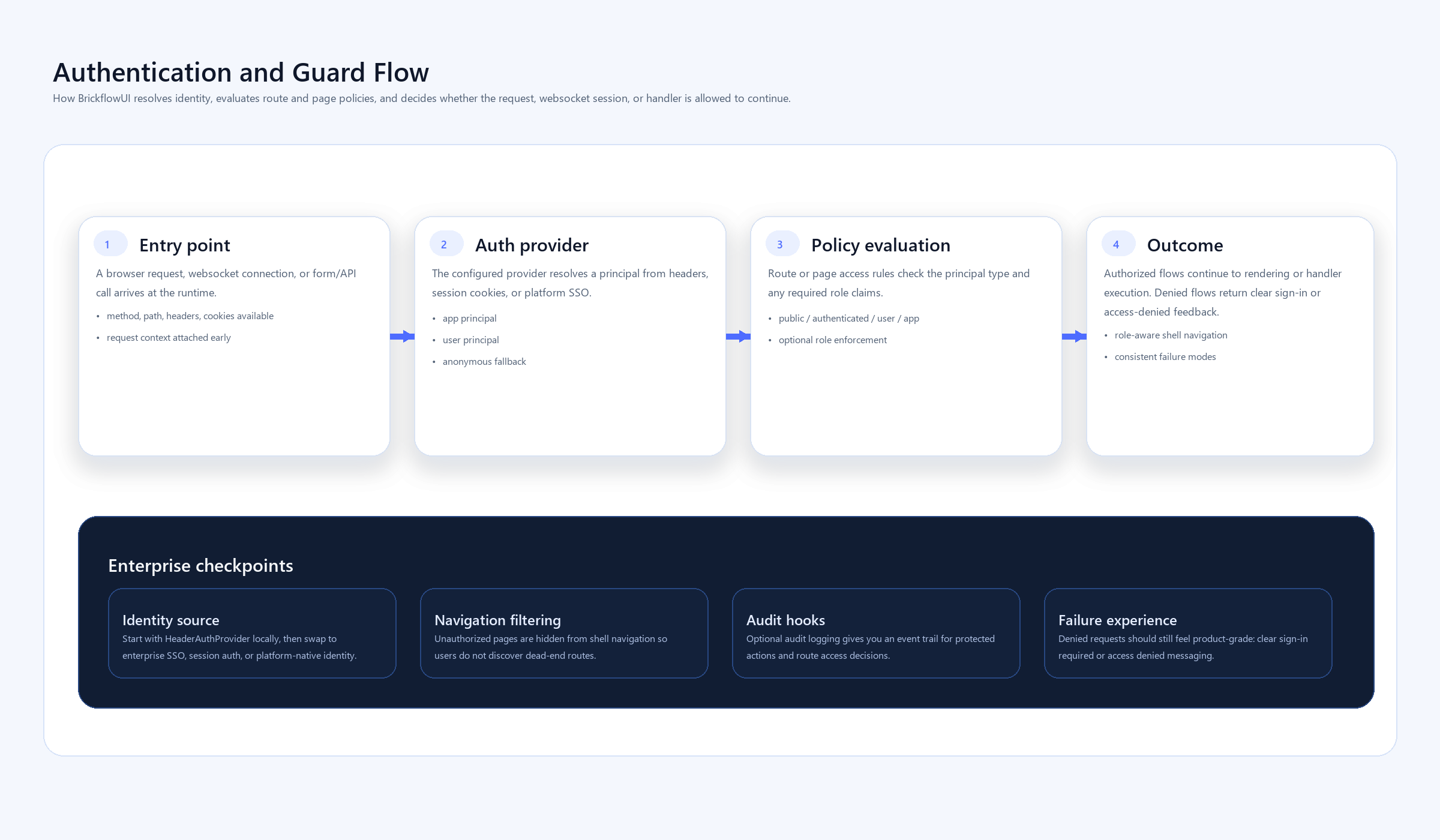
Security design principle:
- the browser is a renderer and event source
- the server stays authoritative for state and access decisions
Performance model
The main performance wins come from:
- no frontend build step in production
- session-scoped state
- incremental patch updates instead of full page reloads
- bundled local assets for CSP-restricted environments
The main performance risks come from:
- expensive work inside event handlers
- expensive work inside page functions on every render
- large tables or chart payloads passed without filtering or pagination
Mobile and responsive behavior
Responsiveness lives in the frontend theme and renderer layer.
Current principles:
- rows wrap by default
- grids collapse down to one column on small screens
- sidebar becomes mobile-toggle navigation
- overlays, drawers, toasts, and date range controls adapt to narrow screens
If a page is still hard to use on mobile, the fix is usually:
- page composition
- overly wide tables
- chart density
- custom inline styles
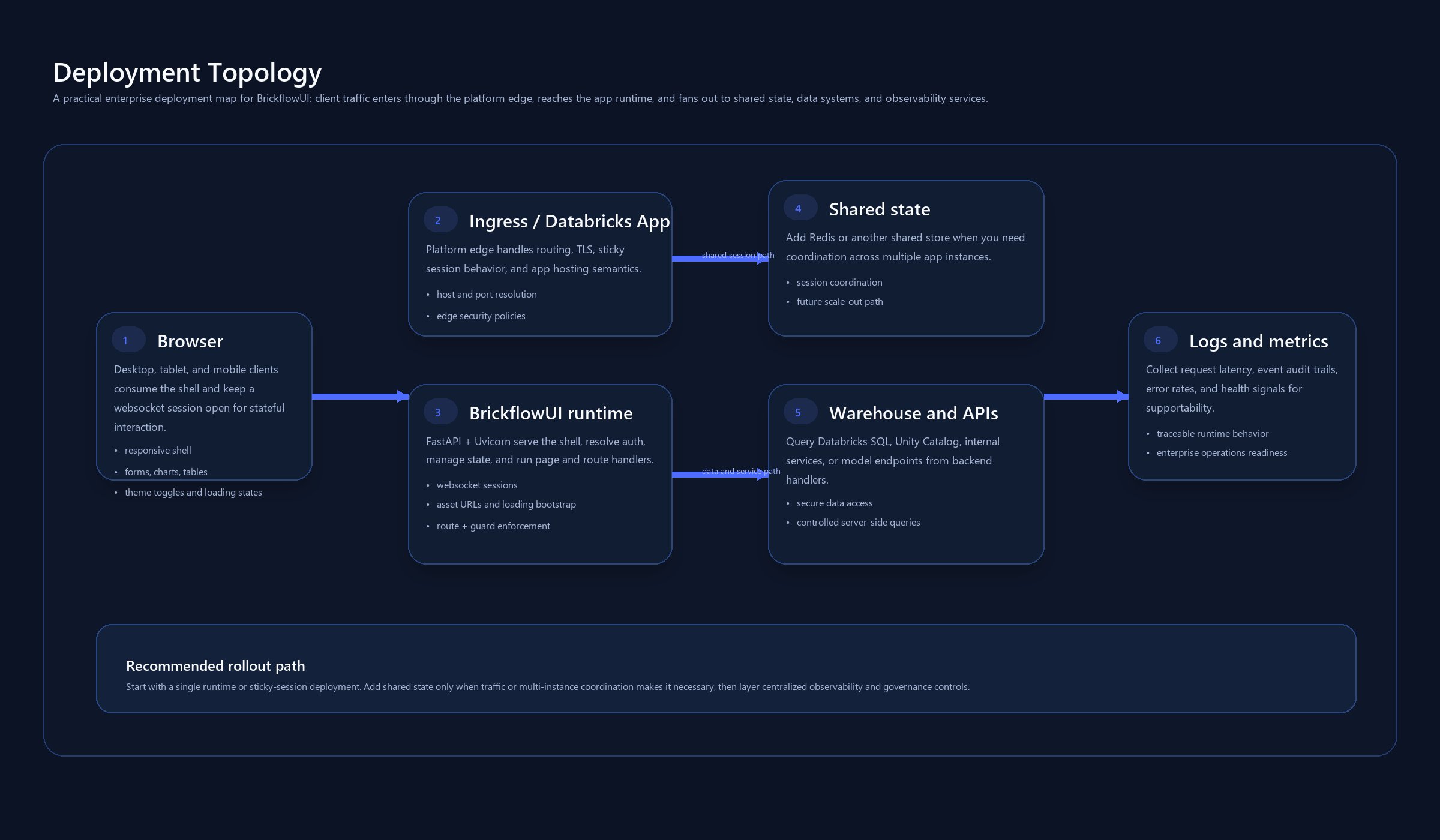
Databricks deployment model
Databricks Apps care about a few things more than a normal local dev app:
- the port comes from the environment
- the Python package must already contain the built frontend
- the app command should run Python directly
- CSP is stricter than many local dev environments
Recommended deployment flow:
- Build the frontend.
- Build the Python package.
- Verify the wheel contains
brickflowui/frontend/dist. - Install from the wheel or a GitHub ref.
- Deploy with
app.py,app.yaml, andrequirements.txt.
File map
These files matter most when debugging architecture problems:
brickflowui/app.pybrickflowui/components.pybrickflowui/state.pybrickflowui/vdom.pybrickflowui/server.pyfrontend/src/App.tsxfrontend/src/Renderer.tsxfrontend/src/theme.cssfrontend/vite.config.tspyproject.toml
Architecture checklist
When a BrickflowUI app behaves strangely, check these in order:
- Is the frontend bundle present in the installed package?
- Is the WebSocket connecting successfully?
- Is the event payload reaching Python correctly?
- Is the session state updating and marking the tree dirty?
- Is the rerender producing a patch or a full-tree error?
- Is the issue in the framework, or in page composition/custom styles?